Two Worlds, One Realization
My first computer was a 486 in the mid-90s. It came with a basic text editor—probably something like Windows Notepad or Write. Black text on a white screen. No formatting. It looked boring.
Then I got Windows 95 and Microsoft Word. It felt like magic. I could make text bold. I could change fonts. I could make headers bigger, add colors, insert clipart. The document looked like something. And I was trapped.
Even decades later in my legal career, my primary working tools were Microsoft Word, Outlook, and Excel. I tracked changes, sent documents back and forth via email with filenames like Draft_Agreement_v3_FINAL_MB_comments_revised_FINAL2.docx. I spent hours reconciling edits from multiple people, fighting with formatting, trying to figure out which version was actually final.
The magic wore off. Somewhere between my third file named FINAL_v2 and watching Word's auto-numbering break for the hundredth time, I started thinking: Does it have to be like this?
It doesn't.
I stumbled into coding through necessity—legal workflows that needed automation, repetitive tasks that made me want to scream. But before I wrote my first Python script, I learned markdown. And I hated it at first.
Plain text again? No formatting toolbar? Just # Header and **bold** and hoping it renders correctly? This felt like going backwards to that boring text editor from 1995.
Except it wasn't.
Markdown turned out to be a leap forward instead of a step back. No fighting with styles. No mysterious formatting corruption. No wondering why the bullet points suddenly changed. Just content. Clean, searchable, version-controllable content. Focus on the substance, not the presentation.
Now, as a developer, I write in plain text. I work in Visual Studio Code—a free code editor that's become the default tool for millions of developers. I save changes to git, a version control system that tracks every change to every file automatically, and can instantly see every modification anyone has made, when they made it, and why. I can search across thousands of files in milliseconds and collaborate without ever wondering which version is current.
The difference isn't just about specific software. It's about fundamentally different approaches to working with information. And it matters more now than ever, because the legal industry is trying to adopt AI while its knowledge is locked in the least AI-friendly format possible: Word documents.
Let me explain.
How The Legal Industry Got Here: The Document-First Trap
Legal work has always been document-centric. Contracts, briefs, memos—these are the artifacts lawyers produce. For decades, that meant paper. When computers arrived, word processors were designed to mimic paper: what you see is what you print.
This made sense. Courts wanted documents that looked like documents. Clients expected professional formatting. The legal industry standardized on Microsoft Office because it solved the immediate problem: making documents look good.
But this created hidden costs:
-
Version control is manual—or fragile. Yes, Office 365 has version history. But it only works if everyone actually uses it correctly. In practice, you still see
Draft_v3_FINAL_MB_comments_revised_FINAL2.docxbecause someone emailed an attachment "just to be safe" or worked offline. And tracked changes becomes unreadable after three rounds of edits from multiple people. -
Collaboration is chaotic—even with modern tools. Office 365 lets multiple people edit simultaneously. Great in theory. In practice? Try it with a 50-page contract and watch the document break. Comments pile up. Inline comparisons become a mess. Styles corrupt when different people use different templates. Someone accepts all changes without reviewing. The technology exists; the workflow still fails.
-
Data is trapped. Information in Word documents can't be easily extracted, analyzed, or automated. Want to pull key terms from 50 contracts? Good luck. The
.docxformat is designed for presentation, not data extraction. Even with modern AI tools, you're fighting the format. -
Format fights back. Numbering breaks. Styles corrupt. Copy-paste from PDFs destroys formatting. Hours of work vanish because Word decided to "help." And this happens despite decades of improvements—the fundamental architecture of Word prioritizes appearance over structure.
Here's what makes it worse: most law firms have Document Management Systems (DMS). iManage, NetDocuments, SharePoint etc.—they're supposed to solve these problems. But walk into any firm and you'll find the same mess. Documents with cryptic version numbers. Partners who save everything to their desktop because the DMS is "too complicated."
What Developers Figured Out Decades Ago
Developers solved these problems not because they're smarter, but because their work broke when they tried to use traditional document workflows.
Plain Text: Simple but Powerful
Code is plain text. Not "formatted text with secret metadata" like a .docx file. Just text. Human-readable, machine-parseable, future-proof.
This sounds trivial. It's not.
Plain text means you can use version control systems like git. You can see exactly what changed between any two versions—not just "John made edits" but "John changed line 47 from return True to return False because [detailed commit message explaining why]."
Plain text means you can automate everything. Scripts can read it, transform it, validate it. You can build tools around it without reverse-engineering proprietary formats.
Plain text means you can actually search. Not Word's limited search, but tools like grep that can search thousands of files instantly using regular expressions—pattern-matching tools that let you find complex text patterns across your entire document library in seconds.
And here's the thing: plain text is what AI models work with best. LLMs don't parse .docx files with embedded formatting, tracked changes, and hidden metadata. They want clean, structured text. Every hour spent wrestling with Word's format is an hour making your data less useful for AI workflows.
The IDE: A Tool That Actually Helps
An IDE (Integrated Development Environment) is basically a supercharged text editor designed for managing complex projects. Visual Studio Code, PyCharm, IntelliJ—these are all IDEs. Think of it as what Word is supposed to be for lawyers—but actually functional.
IDEs have built-in version control. Every change is tracked. You can see who changed what, when, and why. You can create branches to try different approaches without losing your original work. You can merge changes from multiple people automatically, with conflicts highlighted clearly.
Search that actually works. Want to find every place you used a specific term? Instant results across your entire workspace. Want to find every instance where that term appears in a specific context? Regular expressions handle it.
Customization is expected. Developers configure their IDEs extensively. Custom keyboard shortcuts. Linters that check their work automatically. Formatters that enforce consistent style. Extensions that add new capabilities.
The tool helps you think. IDEs provide autocomplete, syntax highlighting, error detection, refactoring tools. They don't just store your work—they actively help you do it better.
Markdown: Structure Without the Fight
For text that needs structure but not complex formatting, developers use Markdown—a simple way to write formatted text using plain text conventions. # Header becomes a header, **bold** becomes bold, - bullet point becomes a bullet point.
You write ## Section 2.1 instead of fighting with Word's heading styles. You write [link text](url) instead of managing hyperlinks that break when you copy-paste. You focus on content, and formatting is applied consistently by whatever tool renders the markdown.
Legal documents could work this way. Contract templates as markdown files, version-controlled in git, rendered to professional PDFs when needed. All the benefits of plain text, with output that still looks like a traditional legal document. Unconventional? Yes. But powerful and effective.
By the way, this post is written in markdown, version-controlled, and rendered to what you're reading now. That's the workflow I use for all my writing now.
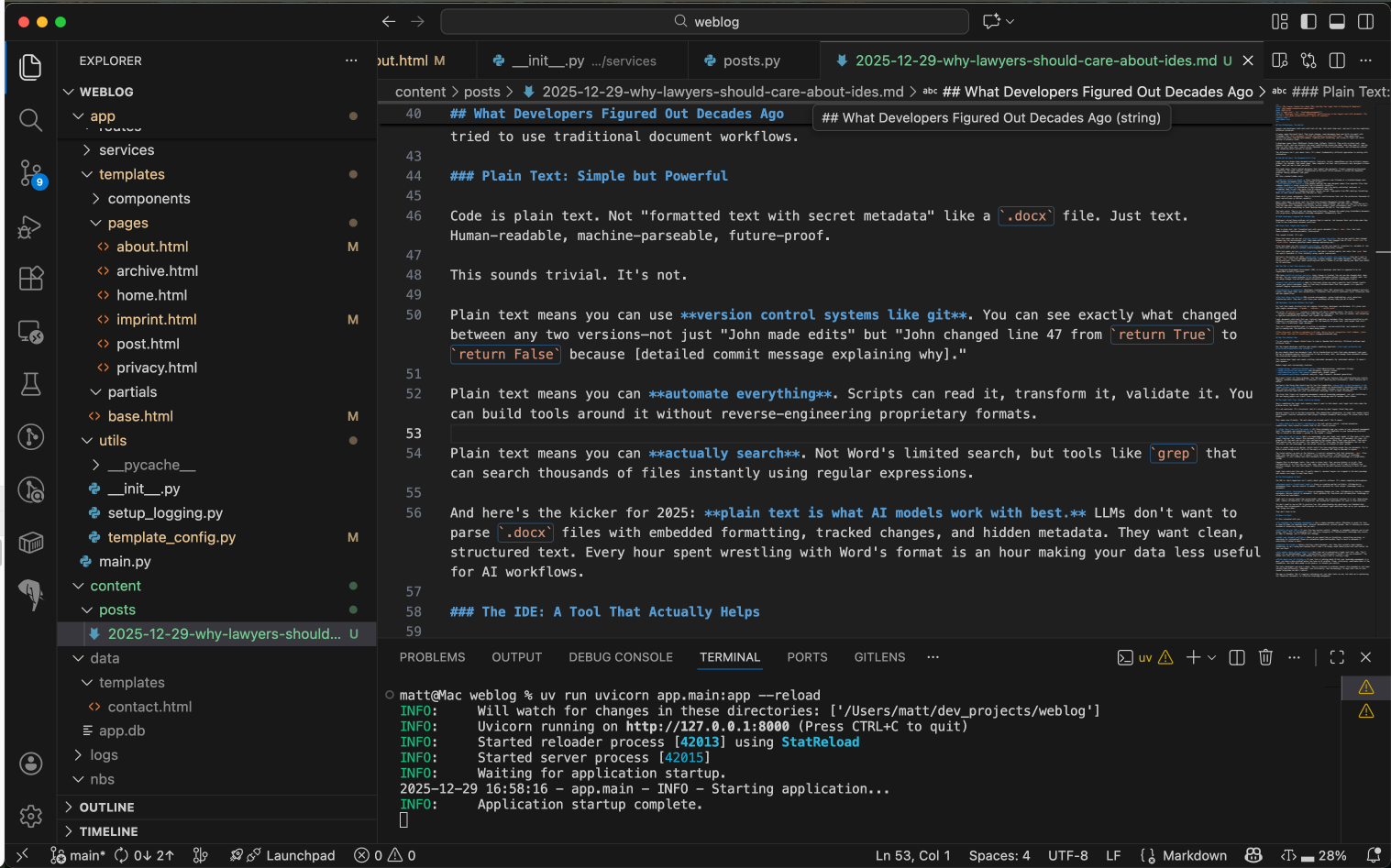 This blog post, written in markdown in VS Code with version control (indicated by the green and yellow highlightings of file names in the left sidebar).
Why This Matters Now
I'm not saying all lawyers should learn to code or abandon Word entirely. Different problems need different tools.
But the lawyer-developer workflow gap reveals something important: the legal profession has prioritized presentation over process.
We care deeply about how documents look. We've standardized on tools that make documents look good. But we've accepted massive inefficiencies in how we create, edit, and manage those documents because the alternatives seemed too technical.
This worked when legal work meant crafting individual documents for individual matters. It doesn't work anymore.
Modern legal work increasingly involves:
- High-volume, repetitive document work (e.g., compliance filings)
- Data extraction and analysis (e.g., due diligence, contract review)
- Collaboration across time zones (e.g., remote work, global teams)
- AI-powered workflows (e.g., contract analysis, legal research, document generation)
Word wasn't built for these problems. Your DMS probably has features that could help—version control, tagging, metadata management—but if everyone's still emailing Word attachments, those features don't matter.
And as mentioned before: messy data in Word documents is the biggest blocker to AI adoption. You can't use LLMs, let alone train such models, on inconsistently formatted contracts. You can't extract insights from documents saved with random filenames across partner desktops. You can't automate workflows when half your institutional knowledge lives in proprietary data formats or email attachments.
The firms that figure out knowledge management now—real knowledge management, not just installing a DMS and hoping people use it—will have a massive advantage when AI becomes table stakes.
The Legal Tech Trap: Vendor Lock-in by Design
Here's something the legal tech industry doesn't want to talk about: most legal tech tools make the problem worse, not better.
It's not malicious. It's structural. And it's driven by what lawyers think they want.
Because lawyers live in the Word ecosystem, they demand Word integration. So legal tech vendors build Word plugins. Contract automation? Word plugin. Document assembly? Word plugin. AI review tools? Word plugin.
This seems user-friendly. "We work where you already work!" But it means:
-
You inherit all of Word's limitations. No real version control. Limited automation capabilities. Data locked in formats that AI can't easily process.
-
Your data lives with the vendor. All those metadata tags you create in your document management tool? The prompts and annotations in your AI assistant? The templates in your automation platform? They're stored in the vendor's system, in the vendor's format.
-
You can't get it out. Here's an experiment: Ask your legal tech vendor if they have a full data export function. Not "export this document to PDF"—export everything. All metadata. All tags. All prompts. All the work you've put into configuring the system. Watch their eyes go blank. Then watch them explain that you can export "the important stuff" (they mean the Word documents) but not the structure, not the knowledge, not the actual value you've created in their system.
This is vendor lock-in by design. Switch tools? You lose everything except the raw documents. Try to build custom integrations? You're at the mercy of whatever API they've decided to expose (if any).
The format matters as much as the features. A contract automation tool that generates .docx files might save time drafting, but it doesn't solve version control, collaboration, or knowledge management. It just creates more Word documents and locks your process knowledge in a proprietary system.
Compare this to developer tools. Your code is plain text. Your version history is in git. Your configuration is in files you can read, copy, and migrate. Switch from VS Code to PyCharm? Your workflow changes, but your data doesn't. Everything is portable because everything is built on open formats.
Legal tech could work this way. It mostly doesn't, because lawyers are trapped in the Word paradigm and vendors are happy to keep them there.
Two Philosophies of Work
The IDE vs. Word comparison isn't really about specific software. It's about competing philosophies:
Document-centric (traditional legal): Focus on creating perfect artifacts. Collaborate by exchanging files. Tools optimize for final output. Knowledge lives in documents.
Process-centric (development): Focus on managing change over time. Collaborate by sharing a common workspace. Tools optimize for iteration and collaboration. Knowledge is structured and searchable.
Legal work is moving toward the second model, whether the profession realizes it or not. High-volume work, remote collaboration, AI integration, and automation requirements all push in that direction.
You don't need to use an IDE to practice law. But understanding why developers use them—and what problems they solve—reveals inefficiencies in traditional legal workflows that we've just accepted as "how things are done."
Where to Start
If this resonated with you:
Try markdown for knowledge management. Use a simple markdown editor (I like Joplin; Obsidian is a great and well-known option as well) for note taking—maybe starting with personal notes before gradually expanding to meeting notes, internal documentation, process guides. See if focusing on content instead of formatting changes how you work.
Actually use your DMS. If your firm has version control, tagging, or metadata features you're not using, start. This is low-hanging fruit. But also recognize its limitations—if knowledge only exists as tags in iManage, you're locked into iManage.
Audit your document workflow. Where do you spend time on formatting, reconciling versions, or searching for information? Those are automation opportunities—but they're hard to automate if everything's locked in Word.
Ask vendors about data portability. Next time you're evaluating a legal tech tool, ask: "Can I export all my data—metadata, tags, configurations, everything—in a format I can use elsewhere?" The answer will tell you a lot about whether you're buying a tool or renting a cage.
Think about your AI strategy. If your firm is talking about AI but your knowledge management is a mess, you have a data problem before you have an AI problem. Clean, structured, searchable data is the foundation. And that data needs to be yours, in formats you control.
The tools developers use aren't magic. They're solutions to problems lawyers also have—we've just been solving them differently. Sometimes, less efficiently. And increasingly, in ways that lock us into vendor ecosystems we don't control.
The gap is closable. But it requires rethinking not just what tools we use, but what we're optimizing for: beautiful documents, or effective knowledge management.